IPTV Smarters Xtream Codes: The Login Explained
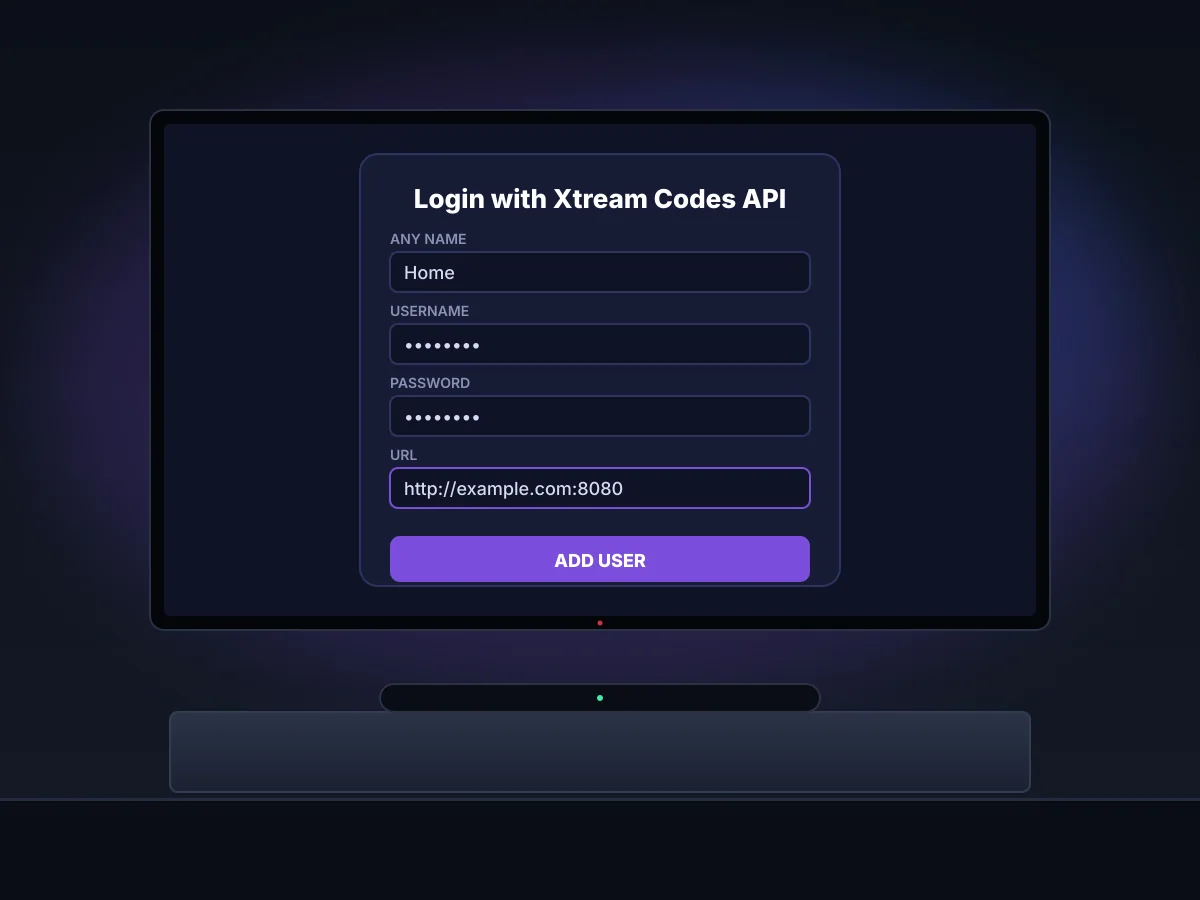
Login with Xtream Codes API is the option most people choose in the app, and the source of most first-day questions. This IPTV Smarters Xtream Codes guide explains what the three details are, how to enter them and what each error message means.
What "Xtream Codes" means
It is the name of a widely used way for a player app to talk to a television service. The app sends your username and password to the service's server address; the server answers with your channel folders, film and series catalogues, guide data and account status. Because everything arrives together and already sorted, it is the simplest way to set up the app.
The four boxes
| Box | What it is | Example of the form |
|---|---|---|
| Any name | Your own label for this login | Home |
| Username | Identifies your account | A string of letters and numbers |
| Password | Protects your account | A string of letters and numbers |
| URL | The service's server address, with its port | http://example.com:8080 |
Type each exactly as it appears in your activation email.
Details people get wrong
- Capital and lower-case letters are different.
- A space at the end of a box, added by the keyboard, breaks the login.
- The letter O and the number 0, and the letter l and the number 1, are easily confused.
- The address must begin with http and include the colon and port number if your email shows one.
- The address goes in the URL box, not the username box.
What the app tells you
| Message | Meaning | Action |
|---|---|---|
| Invalid details or user not found | Username, password or address is wrong | Re-enter all three |
| Account expired | The plan has ended | Start a new plan |
| Maximum connections reached | More devices are playing than the plan allows | Stop a stream on another device |
| Nothing loads, no message | No connection to the server | Check the internet, then the address |
Account information in the app
Once signed in, the app's account screen shows the status of your login, its expiry date and the number of connections allowed. It is the quickest way to check when a plan ends and how many screens it covers.
More than one user
The app can hold several saved logins and lets you switch between them from the user list. A household might keep one for the living-room plan and another belonging to a relative. Each has its own favourites.
Xtream Codes or M3U?
Both reach the same service. Xtream Codes loads live channels, films and series into separate tabs with guide data and catch-up, and it is the method we recommend. M3U is a single link that some other players require; the difference is set out in IPTV Smarters M3U playlist.
Keeping your details safe
Your username and password give access to your plan. Do not post them in forums or share them outside your household; if someone else is using a connection, your own stream may stop. If you think your details have been seen by others, write to support through the Contact page.
Moving to a new device
There is nothing to transfer. Install the app on the new device and enter the same three details. Favourites are stored per device, so you will rebuild that list, which takes a few minutes.
Related guides
The complete installation sequence is in IPTV Smarters Pro Canada setup. What a service must provide for this login to work well is in best IPTV for Smarters Pro.
Why details occasionally change
Now and then a service issues new details: a different server address after maintenance, or a new password at your request. When that happens the old login stops working, usually with an invalid-details message. Open the user list in the app, edit the saved user and replace only the item that changed. Your favourites remain.
One login on shared devices
On a television used by the whole family, a single IPTV Smarters Xtream Codes login is normally enough. Use the parental PIN to lock categories instead of creating separate users. On personal devices, such as a teenager's tablet, sign in with the same details and let that device keep its own favourites.
A checklist before you ask for help
- Re-type all three details, watching for capitals and spaces.
- Confirm the device is online by opening another app.
- Restart the app, then the device.
- Check the account screen for the expiry date.
- Make sure no other device is using the plan's connection.
If the login still fails, write to support with the exact message shown. The complete IPTV Smarters Xtream Codes sequence, from installing the app onward, is in IPTV Smarters Pro Canada setup.
Plans that work with IPTV Smarters Xtream Codes login
Every plan comes with the three details the login asks for.
IPTV Smarters Xtream Codes: common questions
Where do I find my IPTV Smarters Xtream Codes details?
In the activation email sent after your payment is confirmed.
What is the port number?
The digits after the colon in the server address. Enter the address with it, exactly as given.
Why does it say maximum connections?
Another device is already playing on your plan. Stop it, or choose a plan with more screens.
Can I change my username or password?
Write to support if you need new details issued.
More Best IPTV 8K guides
IPTV Smarters guides
Best IPTV 8K by location
Sign in with IPTV Smarters Xtream Codes in two minutes
Order a plan and enter the three details from your email.
See plans from $39 CAD